


WillyWeather
4.7439.00 Reviews
App Specs
- Version
- 4.1.9
- Updated On
- License
- Free
- Downloads
- 1,000,000+
- Developer
- WillyWeather
- Categories
- Weather
- Platform
- Android
Screenshots
 Analysis by AppCompare
Weather apps can be most useful when you need to make a decision, not simply check the temperature. I think WillyWeather makes the most sense for people whose plans depend on what is happening outside: a beach visit, a fishing trip, a walk, or even choosing the right time to leave home. Its mix of local forecasts and activity-relevant details gives me more to work with than a quick glance at a generic daily forecast.
When a signal becomes part of the forecast
Weather information is only useful if it loads when you need it. With an app built around local conditions, maps, and changing forecasts, connectivity can shape the experience: I would check the details before setting out, while I still have a reliable connection, rather than assume every screen will be available wherever I go. That is especially sensible before a coastal drive or a hike where reception may be inconsistent.
For a typical weekday, I might look at the forecast before leaving, then check wind and rain again before deciding whether to cycle or take public transport. For a longer outdoor plan, I would also review the information at the destination rather than relying only on the conditions at home. The practical benefit is not that an app can remove uncertainty; it is that a few well-timed checks can help me notice when the plan deserves a rethink.
Useful on the move, best prepared before you go
The app is aimed at people who care about more than a broad city forecast. A surfer weighing up a beach visit, someone checking conditions before launching a small boat, or a walker trying to choose a comfortable time of day may find the extra weather context worthwhile. I would use it as a planning companion, not as a reason to take risks or ignore local safety advice.
A small workflow makes the information easier to use: choose the place you actually plan to visit, check the relevant conditions before leaving, and revisit them when you have a connection and a reason to adjust your plans. For a day with several stops, checking each destination is more useful than treating the weather at your current location as a stand-in for the whole route.
What to do when a forecast or map does not load
Like other apps that depend on current weather information, WillyWeather is less helpful when a connection is poor or data takes time to appear. I would not wait until I am already at a remote trailhead to make my first check. If a map is slow, I would use the forecast details that have loaded, try again when reception improves, and avoid making a safety-critical call from an incomplete screen.
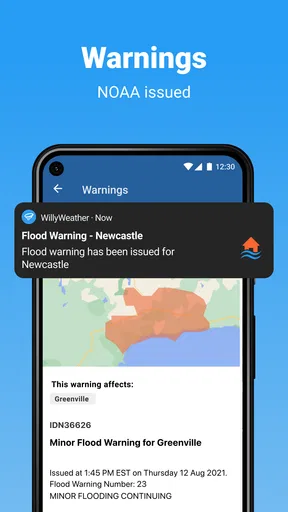
For rapidly changing or hazardous conditions, the app should be one part of a sensible decision, not the sole authority. I would check official local warnings where appropriate and postpone an outing if conditions look uncertain. That cautious approach matters more than any appealing map or precise-looking forecast.
Worth Reading Before You Choose

EA SPORTS FC Mobile 26 Is a Bigger Football Game, but It Takes Time

Flipboard Shows What News Apps Must Do Beyond the Feed

Switching to Android Auto Means Rethinking Your Driving Routine

Google Calendar Makes a Crowded Week Easier to Manage

Ludo King Makes the Most of the Minutes Between Plans

Baby Panda World Brings Quick Play to Modern Phones, but Its Game Library Feels Busy
Keeping checks useful rather than constant
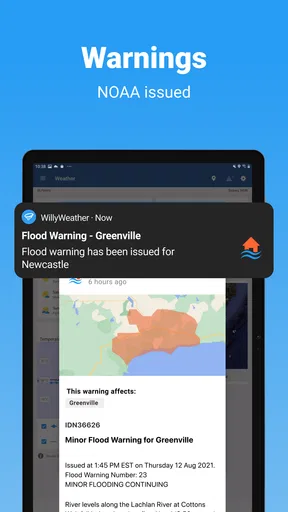
Weather apps can encourage frequent refreshing, but I find it more practical to check at decision points: before travelling, before starting an outdoor activity, and when conditions might change what I do next. WillyWeather’s alerts can help reduce the need to open the app repeatedly, although I would choose only the notifications that matter to my plans. Too many alerts can become background noise, while a carefully chosen warning is easier to act on.
The app is free to download, with in-app purchases listed from $3.49 to $36.00 per item. I would start with the free experience and decide whether any paid option is worthwhile for my routine rather than paying simply because extra detail is available. It is rated for Everyone, and its current version is 4.1.9, with a minimum operating system requirement of 7.1.
That combination suits people who make repeated outdoor decisions and want several kinds of local weather context in one place. If you only need a simple temperature and chance-of-rain glance, your phone’s built-in weather app may be quicker and less demanding. If your plans depend on tides, wind, or other outdoor details, the extra information may justify making WillyWeather part of your routine.
Who will get the most from it
I would recommend it most to people who regularly plan around local outdoor conditions: coastal visitors, anglers, hikers, sailors, and anyone who wants more context than a basic forecast provides. WillyWeather is developed by WillyWeather (Legacy), and its average rating is 4.7 from around 60,000 ratings, with over 1 million installs. Those figures suggest that it has found a substantial audience, though they are not a substitute for deciding whether its particular mix of information suits you.
It may be less appealing if you prefer a minimalist screen, rarely go outdoors, or mainly want a quick glance without exploring several weather details. I also would not choose any single forecast app as the only source for decisions where sudden weather could put people at risk. A second authoritative source is a sensible check when the stakes are high.
Have you ever found yourself deeply invested in planning a perfect weekend outing, only to have the weather rain on your parade—literally? Enter WillyWeather, a nifty little app that's here to save the day. Let me dive into what makes this weather app stand out among the rest.
What Sets WillyWeather Apart?
First things first, WillyWeather isn't your average weather app. It's designed with outdoor enthusiasts in mind, offering more than just your run-of-the-mill temperature updates. So, if you're an avid surfer, fisher, or even a stargazer, you might want to keep reading.
Detailed Weather Data
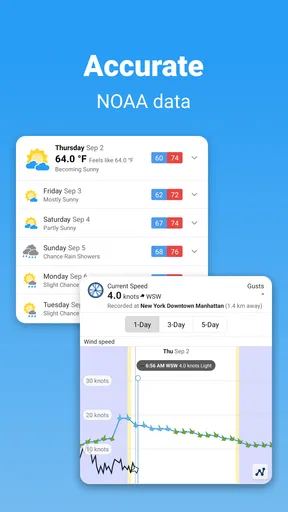
What I truly appreciate about WillyWeather is its comprehensive weather data. It goes beyond simple forecasts and offers a treasure trove of information. We're talking tide times, UV ratings, and even the moon phases! For someone like me, who enjoys a late-night hike under a full moon, this feature is pure gold.
In addition, the app provides wind speed and direction, which is a game-changer for those who love sailing or kite surfing. It's like having a weather station in your pocket.
Location-Specific Forecasts
One thing that drives me nuts with some weather apps is the lack of accuracy. But with WillyWeather, you get location-specific forecasts that seem to hit the nail on the head more often than not. Whether you're in a bustling city or a remote beach, this app's got you covered.
The app uses local data to deliver forecasts tailored to your exact location. No more guessing if that dark cloud is heading your way or just passing through.
Interactive Maps
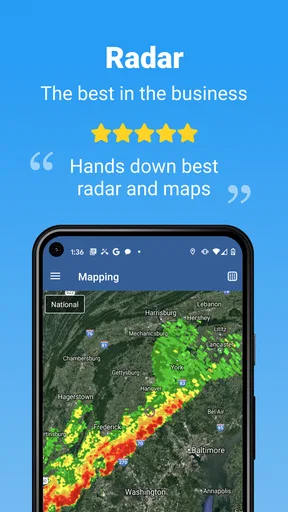
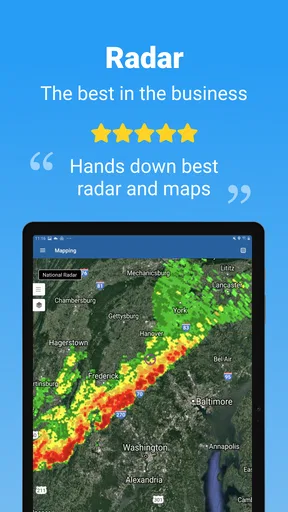
Another feature I find incredibly useful is the interactive weather maps. You can see real-time weather patterns, which makes planning your day a lot easier. Whether you're avoiding a storm or chasing the sun, these maps are a fantastic tool.
The maps are intuitive and easy to navigate, so even if you're not a tech wizard, you can still find your way around.
Customizable Alerts
We all have our personal preferences when it comes to weather alerts. Maybe you want to know when the UV index is high, or perhaps you're more interested in wind warnings. WillyWeather lets you customize alerts based on your specific needs, keeping you informed without bombarding you with unnecessary notifications.
This feature is particularly useful for those who need to stay updated without constantly checking their phones. Just set it and forget it!
User-Friendly Interface
Now, let's talk about the app's design. WillyWeather boasts a clean, user-friendly interface that's easy on the eyes. It's not cluttered with ads, which is a big plus in my book. Everything is neatly organized, so you can find what you need without any hassle.
Navigation is smooth, and the app runs without any hiccups. It's evident that a lot of thought went into making the user experience as seamless as possible.
Perfect for Outdoor Enthusiasts
If you're someone who loves the great outdoors, WillyWeather is like a trusty sidekick. It provides all the essential weather information you need to plan your adventures, whether it's hitting the waves, hiking, or simply enjoying a picnic in the park.
The app's focus on outdoor activities makes it a must-have for anyone who wants to make the most of their time outside.
In conclusion, WillyWeather is a robust and reliable weather app that goes above and beyond the basics. Its detailed data, location-specific forecasts, and customizable alerts make it a standout choice for anyone who needs accurate and relevant weather information.
If you're tired of being caught off guard by unexpected weather changes, give WillyWeather a try. It's like having a personal weather expert right in your pocket.
Pros
- Highly accurate local weather forecasts.
- User-friendly interface with clear visuals.
- Detailed information on tides and moon phases.
- Customizable notifications for weather alerts.
- Covers a wide range of locations globally.
Cons
- Some features require a premium subscription.
- Occasional delays in data updates.
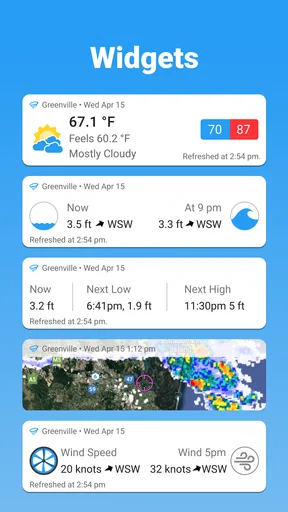
- Limited widget customization options.
- Ads can be intrusive in the free version.
- Initial setup can be slightly confusing.
FAQs for WillyWeather
What features does WillyWeather offer?
WillyWeather provides detailed weather forecasts, including temperature, wind speed, humidity, and precipitation. It also offers tide times, UV ratings, and radar maps. Users can customize alerts for specific weather conditions and access data for multiple locations. The app’s rich features cater to outdoor enthusiasts and those needing precise weather updates.
Is WillyWeather free to use?
WillyWeather is free to download and use, offering a wide range of features without a subscription. However, there may be in-app purchases available for additional features or to remove ads. These options allow users to enhance their experience according to their preferences and needs.
How accurate are the weather forecasts on WillyWeather?
WillyWeather sources its data from reliable meteorological agencies to provide accurate and timely forecasts. While no weather app can guarantee 100% accuracy due to the nature of weather prediction, WillyWeather is known for its precision and detailed insights, making it a trusted choice for users needing reliable weather information.
Can I customize alerts on WillyWeather?
Yes, WillyWeather allows users to customize alerts for various weather conditions, such as severe storms, high winds, or temperature changes. This feature helps users stay informed about important weather events and take necessary precautions. Alerts can be tailored to specific locations, ensuring relevant and timely notifications.
Does WillyWeather support multiple locations?
WillyWeather supports tracking weather information for multiple locations, which is ideal for users who travel frequently or need to monitor weather conditions in different regions. You can easily add and switch between locations to view forecasts and alerts, ensuring you stay updated no matter where you are.


